Replicate MySQL from cPanel to CloudPanel
Keep cPanel MySQL 8.0 databases in sync with CloudPanel's Percona 8.4 until the switch: one coordinated dump, renamed databases, and no skipped errors.
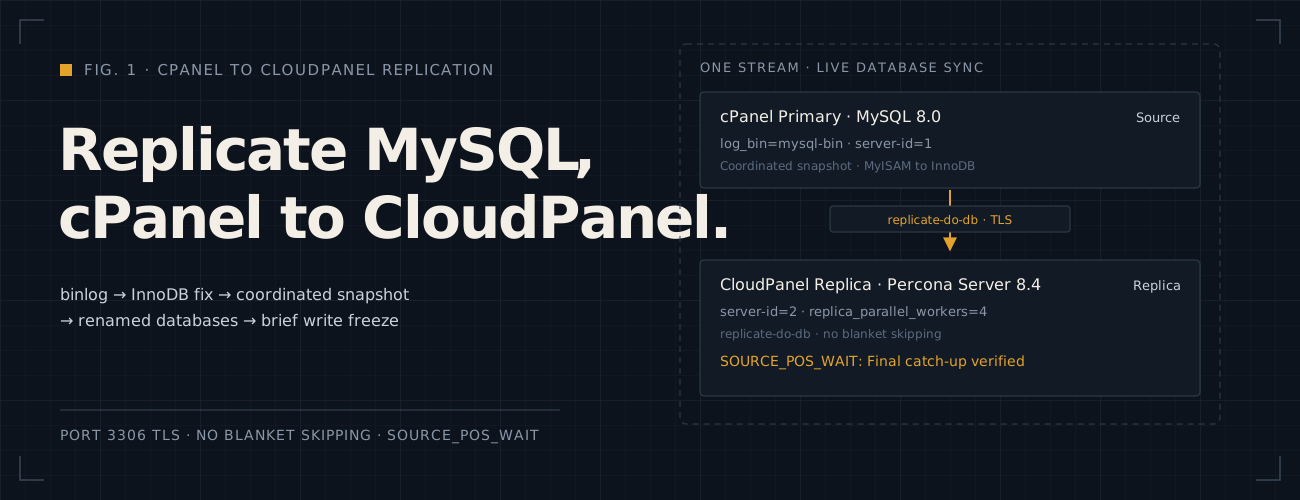
Moving busy WordPress and Moodle sites from cPanel to CloudPanel takes days of file syncing and testing. The live databases keep changing the whole time, so a one-off dump is out of date before you switch. MySQL replication fixes that. According to the MySQL 8.0 Reference Manual (opens in a new tab), a replica copies every change from the source’s binary log, so CloudPanel stays current until the day you move the traffic.
I set this up for two WordPress and six Moodle databases on one cPanel account. CloudPanel uses its own database names,
which cPanel’s cpuser_ prefix never matches. My first attempt also used one dump per database, and that broke
replication more than once. This note is the path that works, with the errors I hit along the way. For the web server
side, see hosting WordPress and Moodle in a subfolder.
For the same idea on Google Cloud, see replicating Cloud SQL for PostgreSQL to a VM.
TL;DR: Turn on cPanel’s binary log, convert MyISAM tables to InnoDB, take one mysqldump --source-data=2 of
every database, rename the USE lines, then let CloudPanel replicate with replicate-rewrite-db and no
replica-skip-errors.
This applies if:
- Source: cPanel on Ubuntu 20.04 with MySQL Community Server 8.0 (I used 8.0.43), and root SSH access.
- Target: CloudPanel 2.5.4 on Ubuntu 24.04, which ships Percona Server for MySQL 8.4 (8.4.11-11 on my host).
- Databases: InnoDB, or MyISAM tables you can convert, with different names on each side.
- Network: CloudPanel can reach the cPanel server on TCP port 3306.
At a glance
All addresses are documentation examples (RFC 5737 (opens in a new tab)), and the database names are made up.
| Setting | cPanel (source) | CloudPanel (replica) |
|---|---|---|
| Address | 203.0.113.10 |
198.51.100.20 |
| Server | MySQL Community Server 8.0.43 | Percona Server for MySQL 8.4.11-11 |
| Config file | /etc/my.cnf |
/etc/mysql/mysql.conf.d/mysqld.cnf |
| Restart | systemctl restart mysql |
systemctl restart mysql |
server-id |
1 |
1 by default, so set it to 2 |
| Binary log | Off (disable-log-bin=1) until Step 1 |
Not needed |
| Database names | cpuser_blog_wp, cpuser_shop_wp, cpuser_lms |
blogwp, shopwp, lms |
| Parallel appliers | Not used | replica_parallel_workers = 4 by default |
Is my cPanel server ready to replicate?
Run this on the cPanel server as root. cPanel’s /root/.my.cnf lets root use mysql without a password.
mysql -e "SELECT VERSION(), @@log_bin, @@server_id, @@binlog_expire_logs_seconds;SELECT TABLE_SCHEMA, COUNT(*) AS myisam_tables FROM information_schema.TABLESWHERE ENGINE = 'MyISAM' AND TABLE_SCHEMA NOT IN ('information_schema', 'mysql', 'performance_schema', 'sys')GROUP BY TABLE_SCHEMA;"@@log_binis0: do Step 1. cPanel turned it off on my server.- Any
myisam_tablesrows: do Step 3 before you dump. @@binlog_expire_logs_seconds: the default2592000keeps 30 days of binary log. Start the replica well within that time after the dump, or the position it needs is gone.
Before you start
- Back up every database on cPanel, and check that the backup restores, before you change table engines.
- Check free space for the dump on both servers (
df -h /home). The dump is about the size of the data. - Create the CloudPanel sites and databases first, in the dashboard. Deleting a CloudPanel site later deletes its databases too, replica or not, so dump a database before you delete its site.
- Keep the CloudPanel copies idle. Don’t browse the new sites or run their cron jobs while replication runs: every Moodle page view writes a session row, and every local write can break replication.
Step 1: Turn on the binary log on cPanel
Edits the MySQL config and restarts MySQL
Replication reads the source’s binary log, the file where MySQL records every change. On my cPanel server it was off.
The [mysqld] section of /etc/my.cnf had this:
[mysqld]disable-log-bin=1default-authentication-plugin=mysql_native_passwordbind-address=*Comment out disable-log-bin and add a server ID and the log name:
[mysqld]# disable-log-bin=1server-id=1log_bin=mysql-bindefault-authentication-plugin=mysql_native_passwordbind-address=*bind-address=* was already there, so MySQL listened on every interface. Keep it, or set the server’s public address.
MySQL 8.0 logs in row format by default, so you don’t need binlog_format.
Check the file before you restart, so a typo can’t stop the live database:
mysqld --validate-config && systemctl restart mysqlIt prints nothing when the file is valid. On Ubuntu the service is mysql. My first try with mysqld failed:
Failed to restart mysqld.service: Unit mysqld.service not found.cPanel’s own /scripts/restartsrv_mysql works too. Then check the log is on:
mysql -e "SHOW VARIABLES LIKE 'log_bin';"+---------------+-------+| Variable_name | Value |+---------------+-------+| log_bin | ON |+---------------+-------+Step 2: Create the replication user
Creates a MySQL account and opens port 3306 to one address
Open TCP port 3306 in the cPanel server’s firewall to CloudPanel’s address only, never to everyone. On my host the
firewall normally allows MySQL from localhost (127.0.0.1) only. For the migration I added one server-to-server rule
for CloudPanel, and I remove it after the switch. Then nc -zv -w 3 203.0.113.10 3306 should connect from CloudPanel
and fail from any other host.
Create an account that can only read the binary log, and only from CloudPanel. Type it at the mysql prompt, not in
mysql -e, so the password stays out of your shell history. The mysql client leaves lines that contain
IDENTIFIED or PASSWORD out of its own history file.
CREATE USER 'replica_user'@'198.51.100.20' IDENTIFIED BY 'a-long-random-password';GRANT REPLICATION SLAVE ON *.* TO 'replica_user'@'198.51.100.20';Use your own long random password. Because
default-authentication-plugin=mysql_native_password, the account uses that plugin, so plain replication works. If
your account uses caching_sha2_password instead, add SOURCE_SSL=1 or GET_SOURCE_PUBLIC_KEY=1 in Step 8, as the
CHANGE REPLICATION SOURCE TO reference (opens in a new tab)
requires.
Step 3: Convert MyISAM tables to InnoDB
Rebuilds tables on the live server
The dump in Step 4 takes a consistent snapshot with --single-transaction, which only works for InnoDB. MyISAM tables
keep changing while they are dumped, so the replica starts from rows that never existed together. My Moodle databases
were all InnoDB, but the WordPress database still had dozens of MyISAM tables from old plugins.
Convert them all with one loop. Run it at a quiet hour: each ALTER TABLE copies its table and blocks writes to it
until it finishes.
mysql -B -N -e "SELECT TABLE_SCHEMA, TABLE_NAME FROM information_schema.TABLESWHERE ENGINE = 'MyISAM' AND TABLE_SCHEMA NOT IN ('information_schema', 'mysql', 'performance_schema', 'sys');" | while IFS=$'\t' read -r schema table; do echo "Converting ${schema}.${table}" mysql -e "SET SESSION sql_mode = ''; ALTER TABLE \`${schema}\`.\`${table}\` ENGINE=InnoDB;" doneThe SET SESSION sql_mode = '' matters. Without it, my first run failed on most WordPress core tables:
ERROR 1067 (42000) at line 1: Invalid default value for 'comment_date'ERROR 1067 (42000) at line 1: Invalid default value for 'post_date'ERROR 1067 (42000) at line 1: Invalid default value for 'user_registered'Old WordPress tables declare 0000-00-00 00:00:00 as a default date. MySQL 8.0’s default strict mode rejects that when
it rebuilds the table. The empty sql_mode applies to that one session only. Run the check from the top of this note
again: it should list no MyISAM tables.
Step 4: Dump every database in one command
Reads data, with a brief global read lock
This is the step I got wrong. I dumped each database in a loop, so each file had its own binary log position. A
replica channel has one position. Starting from the earliest one replays changes that the later dumps already contain,
and starting from the latest one loses changes. My two WordPress dumps were only 1,600 bytes of log apart
(20804241 and 20805841), and that was enough to stop replication.
-
Dump
One file per database
Each dump recorded a different binary log position.
-
Start
Earliest position
The replica replayed rows that the later dumps already held, and stopped on duplicate keys.
-
Workaround
Skipped errors
I added
replica-skip-errors, which hid the drift until a Moodle delete found no row to delete.
One mysqldump call with --databases dumps them all in one transaction, so there is one position for all of them:
mkdir -p /home/migrationmysqldump --single-transaction --source-data=2 --no-create-db \ --routines --triggers --events \ --databases cpuser_blog_wp cpuser_shop_wp cpuser_lms \ > /home/migration/cpanel-dump.sql--single-transactionreads every InnoDB table from one snapshot, while the sites keep writing.--source-data=2writes the binary log position of that snapshot into the file, as a comment.--no-create-dbleaves outCREATE DATABASE, because CloudPanel already created the databases under their new names.--routines --triggers --eventsincludes stored code, which a plain dump leaves out.
To record that position, mysqldump holds a global read lock for a moment. If a long query is running, the lock waits
for it and other writes queue behind it, so check mysql -e "SHOW FULL PROCESSLIST;" first.
Read the position from the file:
grep -m1 -E '^-- CHANGE (MASTER|REPLICATION SOURCE) TO' /home/migration/cpanel-dump.sql-- CHANGE MASTER TO MASTER_LOG_FILE='mysql-bin.000003', MASTER_LOG_POS=12291085;MySQL 8.0.43’s mysqldump still writes the old CHANGE MASTER TO wording. Note the file name and position for
Step 8.
Step 5: Rename the databases inside the dump
Edits the dump file
With --no-create-db, the dump names each database once, on a USE line:
grep -n '^USE ' /home/migration/cpanel-dump.sql28:USE `cpuser_blog_wp`;105:USE `cpuser_shop_wp`;171:USE `cpuser_lms`;Point each line at the CloudPanel name. The pattern matches whole lines only. Row data can’t start a line, because
mysqldump writes each row inside an INSERT statement and escapes line breaks, so the edit never touches your data.
sed -i \ -e 's/^USE `cpuser_blog_wp`;$/USE `blogwp`;/' \ -e 's/^USE `cpuser_shop_wp`;$/USE `shopwp`;/' \ -e 's/^USE `cpuser_lms`;$/USE `lms`;/' \ /home/migration/cpanel-dump.sqlThen look for the old names outside comments:
grep -n 'cpuser_' /home/migration/cpanel-dump.sql | grep -v -E '^[0-9]+:--'Any line it prints is a view, trigger, routine or event that names a database in its body. Fix it by hand. For
example, an event that runs DELETE FROM cpuser_lms.mdl_sessions keeps that name after the rename.
Step 6: Import the dump on CloudPanel
Loads data into the CloudPanel databases
Copy the file from the cPanel server. I ran this on CloudPanel with an SSH key made for the move:
scp -i ~/.ssh/migration_key root@203.0.113.10:/home/migration/cpanel-dump.sql /home/Import it as MySQL’s root user. The USE lines send each part to the right database:
mysql -u root -p < /home/cpanel-dump.sqlCheck that the events came across, and how:
mysql -u root -p -e "SELECT EVENT_SCHEMA, EVENT_NAME, STATUS FROM information_schema.EVENTS;"Imported events keep their ENABLED status, and CloudPanel’s Percona runs the event scheduler by default. An event
would then change replica rows by itself, so Step 7 turns the scheduler off until the switch.
Step 7: Set up the replica on CloudPanel
Edits the MySQL config and restarts MySQL
Add this to the [mysqld] section of /etc/mysql/mysql.conf.d/mysqld.cnf:
[mysqld]server-id = 2
# cPanel name on the left, CloudPanel name on the right.replicate-rewrite-db = cpuser_blog_wp->blogwpreplicate-rewrite-db = cpuser_shop_wp->shopwpreplicate-rewrite-db = cpuser_lms->lms
# Rewriting happens first, so these filters use the CloudPanel names.replicate-do-db = blogwpreplicate-do-db = shopwpreplicate-do-db = lms
# Moodle tables that are emptied and rebuilt after the switch.replicate-wild-ignore-table = %.mdl_sessionsreplicate-wild-ignore-table = %.mdl_cache_flagsreplicate-wild-ignore-table = %.mdl_cache_filters
# Imported events must not write to the replica.event_scheduler = OFF
server-id = 2: Percona’s default is1, the same as cPanel’s, and the replica refuses to connect to a server with its own ID.replicate-rewrite-db: maps each cPanel name to its CloudPanel name. The manual (opens in a new tab) says the translation is done “before the--replicate-*rules are tested”.replicate-do-db: applies only these databases. cPanel’s MySQL also holds other accounts and cPanel’s own databases.replicate-wild-ignore-table: skips Moodle’s session and cache tables in every replicated database (%). They change all the time, and you empty them at the switch anyway.mdl_sessionsonly fills up when Moodle stores sessions in the database, as mine did. Don’t addmdl_h5p_libraries_cachedassets, despite its name: it points to files in Moodle’s data folder, which you copy across.event_scheduler = OFF: stops the imported events. Turn it back on after the switch.
Validate, restart, and check:
mysqld --validate-config && systemctl restart mysqlmysql -u root -p -e "SHOW VARIABLES WHERE Variable_name IN ('server_id', 'event_scheduler');"+-----------------+-------+| Variable_name | Value |+-----------------+-------+| event_scheduler | OFF || server_id | 2 |+-----------------+-------+One limit of these filters: MySQL logs every DDL statement, such as ALTER TABLE, as a statement. The replica filters
statements by the default database, the one chosen with USE. A schema change run from another database, or from none,
never reaches the replica. WordPress and Moodle connect to their own database, so their upgrades replicate. Run your
own schema changes with USE first.
Step 8: Connect and start replication
Starts the replica
In mysql -u root -p on CloudPanel, give the source details and the position from Step 4:
CHANGE REPLICATION SOURCE TO SOURCE_HOST='203.0.113.10', SOURCE_USER='replica_user', SOURCE_PASSWORD='a-long-random-password', SOURCE_LOG_FILE='mysql-bin.000003', SOURCE_LOG_POS=12291085, SOURCE_SSL=1;START REPLICA;SOURCE_SSL=1 encrypts the stream with the certificate MySQL 8.0 generates for itself on first start, with no other
setup. It doesn’t prove the server’s identity, because that certificate is self-signed, but it keeps passwords and rows
off the wire. My replica ran without it, which I’d change.
How do I know replication is working?
Check the replica’s status:
mysql -u root -p -e 'SHOW REPLICA STATUS\G' | grep -E 'Running:|Seconds_Behind|Last_(IO|SQL)_Errno|Rewrite_DB|SSL_Allowed' Replica_IO_Running: Yes Replica_SQL_Running: Yes Source_SSL_Allowed: Yes Seconds_Behind_Source: 0 Last_IO_Errno: 0 Last_SQL_Errno: 0 Replicate_Rewrite_DB: (cpuser_blog_wp,blogwp),(cpuser_shop_wp,shopwp),(cpuser_lms,lms)- Both
Runninglines sayYes. The receiver fetches the log, and the applier writes it. Seconds_Behind_Sourcefalls to0. It can be high for a while after the import.- Each pair in
Replicate_Rewrite_DBstarts with the cPanel name. A reversed pair still showsYesand0.
Why did my replica stop? Errors I hit
Each error below stopped my replica, apart from the reversed rules, which failed silently.
Error 13117: equal server IDs
Last_IO_Errno: 13117Last_IO_Error: Fatal error: The replica I/O thread stops because source and replica have equal MySQL server ids;these ids must be different for replication to work (or the --replicate-same-server-id option must be used onreplica but this does not always make sense; please check the manual before using it).Why it happens
CloudPanel’s Percona starts with server-id 1, the same as the cPanel server after Step 1.
How to fix it
Set server-id = 2 as in Step 7, restart MySQL, and run START REPLICA;.
Error 1146: table doesn’t exist
Last_SQL_Errno: 1146Last_SQL_Error: Coordinator stopped because there were error(s) in the worker(s). The most recent failure being:Worker 1 failed executing transaction 'ANONYMOUS' at source log mysql-bin.000001, end_log_pos 813820.Why it happens
The replica tried to change a table it doesn’t have. I hit this twice:
- Before I added the rewrite rules. Changes for
cpuser_blog_wparrived on a server that only hadblogwp. - When I forgot to import a dump before
START REPLICA.
How to fix it
Add the Step 7 rules, or import the dump. If you started without the dump, run STOP REPLICA; RESET REPLICA;, import,
then run Step 8 again with the dump’s position.
The rules are reversed and nothing replicates
Why it happens
When I added the Moodle databases, I wrote some rules as replicate-rewrite-db = lms->cpuser_lms. The status still
showed Yes, Yes and 0. The only sign was the reversed pairs in Replicate_Rewrite_DB. The Moodle changes were
filtered out, so no error appeared.
How to fix it
Put the cPanel name on the left of every ->, restart MySQL, and check Replicate_Rewrite_DB again.
Error 1062: duplicate entry
Last_SQL_Errno: 1062Last_SQL_Error: Could not execute Write_rows event on table blogwp.wp_options; Duplicate entry '69168382'for key 'wp_options.PRIMARY', Error_code: 1062; handler error HA_ERR_FOUND_DUPP_KEYWhy it happens
The row was already on the replica. In my case, the replica replayed log from before a dump that already held the row, because each database had its own dump and position.
How to fix it
Don’t add replica-skip-errors. I set replica-skip-errors = 1062,1032,1146 to get through, and it hid real drift until
a later delete failed. Reseed from one dump, as in Step 4. If a test write on CloudPanel created the row, delete it on
CloudPanel and run START REPLICA;.
Error 1032: can’t find record
LAST_ERROR_NUMBER: 1032LAST_ERROR_MESSAGE: Worker 1 failed executing transaction 'ANONYMOUS' at source log mysql-bin.000001,end_log_pos 55387664; Could not execute Delete_rows event on table lms.mdl_sessions; Can't find record in'mdl_sessions', Error_code: 1032; handler error HA_ERR_KEY_NOT_FOUNDWhy it happens
cPanel deleted a row that the replica didn’t have. Mine was a Moodle session row. Session rows differ between the two servers as soon as anyone opens the CloudPanel copy, or after an earlier error was skipped.
How to fix it
Find the failing table first, in the worker table on CloudPanel:
SELECT WORKER_ID, LAST_ERROR_NUMBER, LAST_ERROR_MESSAGEFROM performance_schema.replication_applier_status_by_workerWHERE LAST_ERROR_NUMBER <> 0\GIf it’s mdl_sessions or a Moodle cache table, add the replicate-wild-ignore-table lines from Step 7, restart
MySQL, and skip the one transaction (next section). That’s what I did. If it’s any other table, the data has drifted: reseed from one dump.
How do I skip one transaction safely?
Skipping drops the whole transaction, not one row. So read it first, on cPanel, from the replica’s last applied
position (Exec_Source_Log_Pos in SHOW REPLICA STATUS\G):
mysql -e "SHOW BINLOG EVENTS IN 'mysql-bin.000001' FROM 55384445 LIMIT 30;"If every event up to the Xid (the commit) touches only the session table, skip it on CloudPanel:
STOP REPLICA;SET GLOBAL sql_replica_skip_counter = 1;START REPLICA;The manual on skipping transactions (opens in a new tab) only requires both replica threads to be stopped first. This worked for me with the default 4 parallel workers.
How do I switch to CloudPanel without losing writes?
Stops writes on cPanel and promotes CloudPanel
The switch moves the databases and the sites together, in one maintenance window. This section covers the database side: stop writes on cPanel, let CloudPanel catch up, detach the replica, then move the traffic. The order matters. If traffic reaches CloudPanel before the last change arrives, that change is lost.
1. Stop writes on cPanel
Put the sites into maintenance mode and stop their cron jobs. For Moodle, the command-line switch works even when the database is read-only, because it writes a file into Moodle’s data folder:
sudo -u cpuser php /home/cpuser/public_html/moodle/admin/cli/maintenance.php --enableThen stop every write to cPanel’s MySQL, and read its final binary log position:
mysql -e "SET GLOBAL event_scheduler = OFF; SET PERSIST super_read_only = ON; SHOW MASTER STATUS;"+------------------+----------+--------------+------------------+-------------------+| File | Position | Binlog_Do_DB | Binlog_Ignore_DB | Executed_Gtid_Set |+------------------+----------+--------------+------------------+-------------------+| mysql-bin.000003 | 12913493 | | | |+------------------+----------+--------------+------------------+-------------------+super_read_only blocks writes from every account, root included. It covers the whole MySQL server, so cPanel’s own
databases and any other accounts on that server stop writing too. SET PERSIST keeps it on if MySQL restarts, which
cPanel’s updates can do. Any write now fails:
ERROR 1290 (HY000) at line 1: The MySQL server is running with the --super-read-only option so it cannot execute this statement2. Wait for CloudPanel to catch up
On CloudPanel, wait for that exact position, using the File and Position from step 1:
SELECT SOURCE_POS_WAIT('mysql-bin.000003', 12913493, 60) AS caught_up;A number of 0 or more means the replica has applied everything up to that position. -1 means it timed out, and
NULL means replication isn’t running. Don’t go on until you get a number.
Then compare a few tables that matter. Leave out the tables you ignored in Step 7, which differ on purpose:
mysql -e "CHECKSUM TABLE cpuser_blog_wp.wp_posts, cpuser_lms.mdl_user;"mysql -u root -p -e "CHECKSUM TABLE blogwp.wp_posts, lms.mdl_user;"Run the first on cPanel and the second on CloudPanel. The Checksum values must match, table by table.
3. Detach the replica
On CloudPanel, stop replication and delete its settings, so a MySQL restart can’t reconnect to cPanel:
STOP REPLICA;RESET REPLICA ALL;Then remove the replicate- lines and the event_scheduler = OFF line from mysqld.cnf. Keep server-id. MySQL
turns the event scheduler back on by default, so the imported events run again. Validate and restart:
mysqld --validate-config && systemctl restart mysqlmysql -u root -p -e "SHOW REPLICA STATUS\G SHOW VARIABLES LIKE 'event_scheduler';"+-----------------+-------+| Variable_name | Value |+-----------------+-------+| event_scheduler | ON |+-----------------+-------+SHOW REPLICA STATUS prints nothing, because this server is no longer a replica.
4. Empty the tables you didn’t replicate
The session and cache tables on CloudPanel still hold rows from the day of the import. Empty them in each Moodle database, then clear Moodle’s caches once the final file sync is done:
TRUNCATE TABLE lms.mdl_sessions;TRUNCATE TABLE lms.mdl_cache_flags;TRUNCATE TABLE lms.mdl_cache_filters;sudo -u lmsuser php /home/lmsuser/htdocs/lms.example.com/admin/cli/purge_caches.phpEveryone has to log in again, because their sessions are gone.
5. Move the traffic
Point DNS, or the IP address, at CloudPanel. The final file sync copies Moodle’s maintenance file too, so turn
maintenance off on CloudPanel with maintenance.php --disable. Then turn on the CloudPanel cron jobs.
Leave cPanel read-only. Once CloudPanel takes new writes, going back to cPanel loses them, so a rollback means
copying those writes back first. When you’re sure, remove the port 3306 firewall rule on cPanel, so MySQL is back to
localhost only. If you ever need cPanel writable again, run RESET PERSIST super_read_only; and
SET GLOBAL super_read_only = OFF, read_only = OFF;.
What I’d do differently: convert every MyISAM table before the first dump, and take one dump of all databases from
the start. I’d never add replica-skip-errors: it turned one early mistake into guessing which rows were still
right. I’d also set SOURCE_SSL=1 from the first CHANGE REPLICATION SOURCE TO.
Sources
- MySQL 8.0 Reference Manual: Replication (opens in a new tab)
- MySQL 8.0 Reference Manual: mysqldump (opens in a new tab)
- MySQL 8.0 Reference Manual: Replica server options and variables (opens in a new tab)
- MySQL 8.0 Reference Manual: Evaluation of database-level replication options (opens in a new tab)
- MySQL 8.0 Reference Manual: CHANGE REPLICATION SOURCE TO (opens in a new tab)
- MySQL 8.0 Reference Manual: Skipping transactions (opens in a new tab)
- MySQL 8.0 Reference Manual: Replication functions (SOURCE_POS_WAIT) (opens in a new tab)