Build PHP 8.3 from Source beside PHP 7.4 on Ubuntu 20.04
Build PHP 8.3 from source beside PHP 7.4 on Ubuntu 20.04: verified source, Ubuntu's OpenSSL, staged install, Imagick, and a separate FPM service.
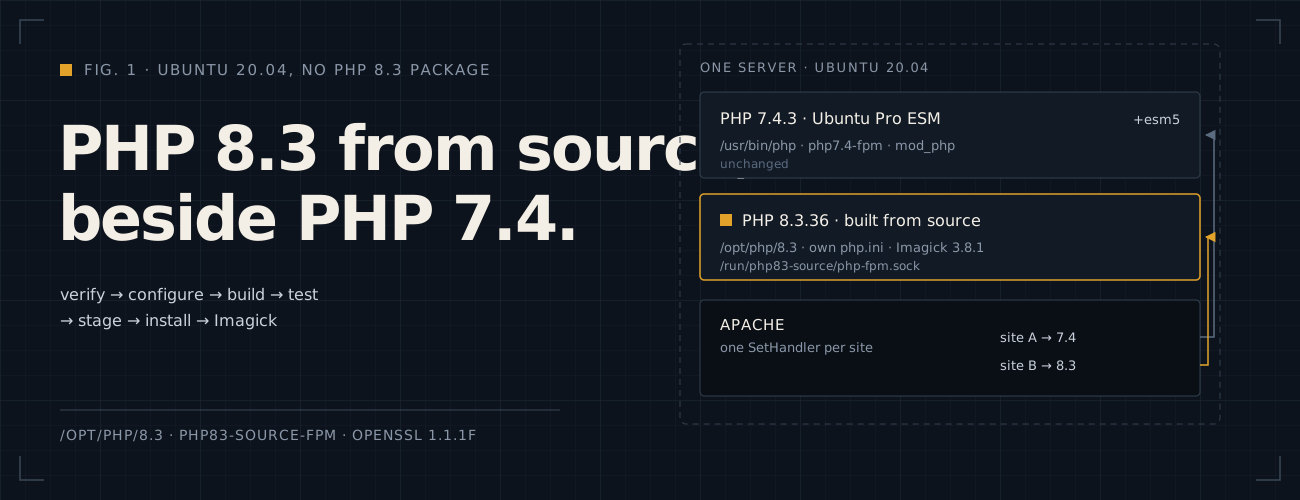
This note builds PHP 8.3.36 from source into /opt/php/8.3 on Ubuntu 20.04, with its own FPM service, next to the
PHP 7.4 that sites still use, because 20.04 has no PHP 8.3 package. It prepares the move to PHP 8.3 one site at a time;
it is not the security fix. PHP 7.4 on this host was already patched through Ubuntu Pro ESM during the
October 2026 PHP patching.
Ubuntu 20.04 has no PHP 8.3 package anywhere: not in Ubuntu, not in Ubuntu Pro, which only maintains the PHP 7.4 that 20.04 shipped, and not in Ondřej Surý’s free PPA, which no longer builds for 20.04. Upgrading the OS or running PHP in a container would also work. Building from source keeps everything on the server as it is. According to PHP’s advisory of October 21, 2026 (opens in a new tab), 8.3.36 is the 8.3 release with the fixes; PHP’s downloads page (opens in a new tab) has its source and checksum.
At a glance:
| What | Value |
|---|---|
| Prefix | /opt/php/8.3 |
| Binaries | /opt/php/8.3/bin/php, /opt/php/8.3/sbin/php-fpm |
php.ini |
/opt/php/8.3/etc/php.ini, from php.ini-production |
| Extra settings | /opt/php/8.3/etc/conf.d/*.ini |
| FPM configuration | /opt/php/8.3/etc/php-fpm.conf |
| FPM socket | /run/php83-source/php-fpm.sock, owned by www-data |
| Service | php83-source-fpm |
| Extension folder | /opt/php/8.3/lib/php/extensions/no-debug-non-zts-20230831 |
| OpenSSL | Ubuntu’s 1.1.1f, from /usr/lib/x86_64-linux-gnu |
| Left unchanged | PHP 7.4, its FPM pool, Apache’s mod_php and /usr/bin/php |
| Updates | None from APT: every PHP 8.3 security release means building again |
TL;DR: verify PHP’s source, build it against Ubuntu’s own libraries into /opt/php/8.3, test it before it
touches /opt, and run it as its own FPM service, so PHP 7.4 never changes.
This applies if:
- OS: Ubuntu 20.04 (or another release with no PHP 8.3 package you can use), on x86-64.
- Current PHP: a PHP 7.4 that sites still need, here Ubuntu’s own build patched through Ubuntu Pro ESM.
- Web server: Apache, sending sites to PHP-FPM with
SetHandlerandproxy_fcgi. - Toolchain: GCC,
makeandautoconffrombuild-essential, plus the-devlibraries in step 2. - Resources:
sudo, free disk space for the build tree and some spare CPU: the build runs on four cores, behind the live sites.
The commands run as a normal user, except where they say sudo. Building as root is no faster.
Step 1: Check the toolchain and which OpenSSL the system really uses
command -v gcc make autoconf pkg-configtype -a opensslopenssl versionldd /usr/bin/php7.4 | grep -E 'ssl|crypto'ldconfig -p | grep -E 'lib(ssl|crypto)\.so\.1\.1'grep -RInE '/usr/local' /etc/ld.so.conf /etc/ld.so.conf.dnprocThis host had a surprise: a custom OpenSSL 1.1.1w in /usr/local, next to Ubuntu’s 1.1.1f. The linker
configuration listed /usr/local/lib first, so even PHP 7.4 loaded the custom libraries, and pkg-config and GCC
preferred its headers. Changing the global linker setup would have affected every running application, so it stayed
as it was. The build below points PHP 8.3 at Ubuntu’s OpenSSL for itself only. If /usr/local shows nothing on your
server, the same commands still work.
Step 2: Install the build dependencies
Simulate first. Development packages can upgrade shared libraries that running services use:
deps=(build-essential autoconf bison re2c pkg-config  libssl-dev libcurl4-openssl-dev libxml2-dev libsqlite3-dev libonig-dev libzip-dev libicu-dev  libjpeg-dev libpng-dev libfreetype6-dev libsodium-dev libreadline-dev libxslt1-dev libgmp-dev libbz2-dev)
sudo apt-get -s --no-remove install "${deps[@]}"sudo apt-get --no-remove install "${deps[@]}"
On my host this upgraded 13 shared libraries and added 26 packages, with no removals. Afterwards, check that the old stack is still healthy:
php7.4 -vsudo php-fpm7.4 -tsudo apache2ctl configtestsystemctl is-active apache2 php7.4-fpmsudo dpkg --auditStep 3: Download PHP 8.3 and verify it
Take the newest 8.3 release from PHP’s source downloads (opens in a new tab), which was 8.3.36, with its SHA-256 digest from the same page:
mkdir -p ~/php83-build && cd ~/php83-build
curl --fail --location --proto '=https' -o php-8.3.36.tar.xz \  https://www.php.net/distributions/php-8.3.36.tar.xzcurl --fail --location --proto '=https' -o php-8.3.36.tar.xz.asc \  https://www.php.net/distributions/php-8.3.36.tar.xz.asc
printf '%s\n' 'dd54693aa334c5c4d72e9aee96b082c2473750a18a6c1d105789c93a3b1692fd  php-8.3.36.tar.xz' |  sha256sum -c -
Then check the signature against the PHP 8.3 release managers’ keys, in a keyring of its own. The fingerprints are the ones PHP lists for the 8.3 branch:
mkdir -p signing-keys && chmod 700 signing-keys
gpg --homedir "$PWD/signing-keys" --keyserver hkps://keyserver.ubuntu.com --recv-keys \  1198C0117593497A5EC5C199286AF1F9897469DC \  AFD8691FDAEDF03BDF6E460563F15A9B715376CA \  C28D937575603EB4ABB725861C0779DC5C0A9DE4
gpg --homedir "$PWD/signing-keys" --verify php-8.3.36.tar.xz.asc php-8.3.36.tar.xz
sha256sum should print OK, and gpg should print Good signature. It also warns that the key “is not certified
with a trusted signature”: that is normal in a fresh keyring. A bad signature is not.
Step 4: Configure the build against Ubuntu’s OpenSSL
GCC searches /usr/local/include before /usr/include, and an -I/usr/include flag does not change that, because GCC
ignores -I for its own system folders. A folder that holds only a link to Ubuntu’s OpenSSL headers comes first
without that problem:
mkdir -p ~/php83-build/system-headersln -sfn /usr/include/openssl ~/php83-build/system-headers/openssl
printf '#include <openssl/opensslv.h>\nOPENSSL_VERSION_TEXT\n' |  gcc -E -I"$HOME/php83-build/system-headers" - | tail -n 1
That should print Ubuntu’s version, "OpenSSL 1.1.1f 31 Mar 2020" here. Then configure, with every search path
pointed at Ubuntu’s folders for this build only:
cd ~/php83-buildtar -xf php-8.3.36.tar.xzcd php-8.3.36
(  export PATH=/usr/bin:/bin  export PKG_CONFIG_PATH=  export PKG_CONFIG_LIBDIR=/usr/lib/x86_64-linux-gnu/pkgconfig:/usr/lib/pkgconfig:/usr/share/pkgconfig  export CPPFLAGS="-I$HOME/php83-build/system-headers -I/usr/include/x86_64-linux-gnu -I/usr/include"  export LDFLAGS="-L/usr/lib/x86_64-linux-gnu -Wl,-rpath,/usr/lib/x86_64-linux-gnu"  export OPENSSL_CFLAGS="-I/usr/include"  export OPENSSL_LIBS="-L/usr/lib/x86_64-linux-gnu -lssl -lcrypto"
  ./configure \    --prefix=/opt/php/8.3 \    --with-config-file-path=/opt/php/8.3/etc \    --with-config-file-scan-dir=/opt/php/8.3/etc/conf.d \    --enable-fpm --with-fpm-user=www-data --with-fpm-group=www-data \    --disable-cgi \    --with-openssl --with-curl --with-zlib --with-bz2 \    --enable-mbstring --enable-intl \    --enable-gd --with-jpeg --with-freetype \    --with-mysqli=mysqlnd --with-pdo-mysql=mysqlnd --with-pdo-sqlite --with-sqlite3 \    --with-zip --with-xsl --with-readline --with-sodium --with-gmp \    --enable-bcmath --enable-calendar --enable-exif --enable-soap --enable-sockets --enable-pcntl \    --enable-opcache \    > ../configure.log 2>&1)echo "configure exit: $?"grep -E '^EXTRA_LIBS' Makefile | grep -o -- '-lssl -lcrypto' | head -1
The exit should be 0, and the last line should print -lssl -lcrypto. Two things I learned the hard way:
OPENSSL_LIBSmust use-L… -lssl -lcrypto. With full paths to the.sofiles instead, configure passed but the final link failed for lack of OpenSSL.- Without the
system-headersfolder, the build compiled against the custom 1.1.1w headers and ran on Ubuntu’s 1.1.1f library, a mismatch you only see in step 5.
This build leaves out Apache’s PHP module on purpose: Apache keeps running PHP 7.4, and PHP 8.3 runs only through FPM.
Step 5: Build, check OpenSSL and run the tests
cd ~/php83-build/php-8.3.36nice -n 10 make -j4 > ../build.log 2>&1echo "build exit: $?"tail -n 3 ../build.log
./sapi/cli/php -n --ri openssl | grep -E 'Library Version|Header Version'
make -j4 uses four of the server’s cores and nice keeps the build behind the live sites; more jobs build faster but
take more from the applications. The build ends with Build complete.. The two OpenSSL lines must show the same
version, 1.1.1f here: if the header line says something else, the headers came from /usr/local.
Then run the tests that matter most here, still as your own user:
NO_INTERACTION=1 REPORT_EXIT_STATUS=1 nice -n 10 make test \ TESTS="-j4 Zend/tests tests/basic ext/openssl ext/curl ext/session ext/gd ext/zip" > ../tests.log 2>&1echo "tests exit: $?"tail -n 30 ../tests.logMine had 5,282 passes, no failures and two expected failures. If the test runner offers to send a report, decline.
Step 6: Stage the install, test FPM and clean the library paths
Install into a staging folder first, so nothing in /opt changes until the build is checked:
cd ~/php83-build/php-8.3.36make install INSTALL_ROOT="$HOME/php83-build/stage" > ../stage-install.log 2>&1echo "stage exit: $?"
NO_INTERACTION=1 REPORT_EXIT_STATUS=1 nice -n 10 make test TESTS="-j4 sapi/fpm/tests" > ../fpm-tests.log 2>&1echo "FPM tests exit: $?"tail -n 15 ../fpm-tests.log
The FPM tests passed 119, failed none and skipped 11. One “warned” test was marked as an expected failure but passed.
The binaries then carry a library search path with leftovers from the build machine, such as a /build/libjpeg-turbo-…
folder. patchelf sets it to Ubuntu’s library folder alone. Unpacking the package into the build folder avoids
installing another tool on the server:
mkdir -p ~/php83-build/tools && cd ~/php83-build/toolsapt-get download patchelfdpkg-deb -x patchelf_*.deb extracted
(  set -e  patcher="$HOME/php83-build/tools/extracted/usr/bin/patchelf"  staged="$HOME/php83-build/stage/opt/php/8.3"  while IFS= read -r -d '' file; do    if readelf -h "$file" >/dev/null 2>&1; then      echo "Updating: $file"      "$patcher" --set-rpath /usr/lib/x86_64-linux-gnu "$file"    fi  done < <(find "$staged" -type f \( -perm /111 -o -name '*.so' \) -print0))
Check the result:
staged="$HOME/php83-build/stage/opt/php/8.3"for binary in "$staged/bin/php" "$staged/sbin/php-fpm"; do readelf -d "$binary" | grep -E 'RPATH|RUNPATH' ldd "$binary" | grep -E 'ssl|crypto|not found'done"$staged/bin/php" -n --ri openssl | grep -E 'Library Version|Header Version'Each binary should show Library runpath: [/usr/lib/x86_64-linux-gnu], load libssl and libcrypto from
/usr/lib/x86_64-linux-gnu, and find every library.
Step 7: Install into /opt and configure it
Copy the staged build into place. The first line stops if /opt/php/8.3 already exists, so an earlier install is
never overwritten by accident:
( set -e sudo test ! -e /opt/php/8.3 sudo mkdir -p /opt/php sudo cp -a "$HOME/php83-build/stage/opt/php/8.3" /opt/php/ sudo chown -R root:root /opt/php/8.3 sudo mkdir -p /opt/php/8.3/etc/conf.d sudo install -m 644 "$HOME/php83-build/php-8.3.36/php.ini-production" /opt/php/8.3/etc/php.ini)Add the local settings. The two CA lines matter on this host, whose custom OpenSSL looks for certificates in the wrong place, and upload progress stays off, as PHP’s October 23 advisory suggests:
sudo tee /opt/php/8.3/etc/conf.d/99-local.ini >/dev/null <<'EOF'expose_php = Offopenssl.cafile = /etc/ssl/certs/ca-certificates.crtcurl.cainfo = /etc/ssl/certs/ca-certificates.crtsession.upload_progress.enabled = Offzend_extension = /opt/php/8.3/lib/php/extensions/no-debug-non-zts-20230831/opcache.soopcache.enable = 1opcache.jit = offEOFThen a small FPM pool of its own, starting workers only when requests arrive:
sudo tee /opt/php/8.3/etc/php-fpm.conf >/dev/null <<'EOF'[global]pid = /run/php83-source/php-fpm.piderror_log = /var/log/php83-source-fpm.logdaemonize = no
[www]user = www-datagroup = www-datalisten = /run/php83-source/php-fpm.socklisten.owner = www-datalisten.group = www-datalisten.mode = 0660pm = ondemandpm.max_children = 4pm.process_idle_timeout = 10spm.max_requests = 500clear_env = yessecurity.limit_extensions = .phpEOF
/opt/php/8.3/bin/php -v/opt/php/8.3/bin/php --inisudo /opt/php/8.3/sbin/php-fpm -t --fpm-config /opt/php/8.3/etc/php-fpm.conf
php -v should mention Zend OPcache v8.3.36, --ini should list 99-local.ini, and the test should end with
test is successful.
Step 8: Run it as its own service
sudo tee /etc/systemd/system/php83-source-fpm.service >/dev/null <<'EOF'[Unit]Description=PHP 8.3 source-built FastCGI Process ManagerAfter=network.target
[Service]Type=simpleRuntimeDirectory=php83-sourceRuntimeDirectoryMode=0755ExecStart=/opt/php/8.3/sbin/php-fpm --nodaemonize --fpm-config /opt/php/8.3/etc/php-fpm.confExecReload=/bin/kill -USR2 $MAINPIDKillSignal=SIGQUITRestart=on-failureRestartSec=3PrivateTmp=true
[Install]WantedBy=multi-user.targetEOF
sudo systemctl daemon-reloadsudo systemctl enable --now php83-source-fpm
systemctl is-active php83-source-fpm php7.4-fpm apache2sudo ls -l /run/php83-source/php-fpm.sockphp -v/opt/php/8.3/bin/php -v
All three services should be active, and the socket should belong to www-data. Plain php still answers with 7.4;
PHP 8.3 answers only by its full path.
Step 9: Add Imagick to PHP 8.3 only
PHP 7.4’s imagick.so cannot be reused: an extension is built for one PHP API, and 8.3’s is 20230831. First the
ImageMagick development files. Simulate again, because these are shared libraries that PHP 7.4’s Imagick uses too:
sudo apt-get -s --no-remove --no-install-recommends install libmagickwand-devsudo apt-get --no-remove --no-install-recommends install libmagickwand-devThat was 18 upgrades and 63 new packages here, with no removals. Then build the newest stable Imagick from
PECL (opens in a new tab), 3.8.1 here, with PHP 8.3’s own phpize and php-config:
mkdir -p ~/php83-build/extensions && cd ~/php83-build/extensionscurl --fail --location --proto '=https' -o imagick-3.8.1.tgz https://pecl.php.net/get/imagick-3.8.1.tgztar -xzf imagick-3.8.1.tgzcd imagick-3.8.1
(  set -e  export PATH=/opt/php/8.3/bin:/usr/bin:/bin  export PKG_CONFIG_PATH=  export PKG_CONFIG_LIBDIR=/usr/lib/x86_64-linux-gnu/pkgconfig:/usr/lib/pkgconfig:/usr/share/pkgconfig  export CPPFLAGS="-I$HOME/php83-build/system-headers -I/usr/include/x86_64-linux-gnu -I/usr/include"  export LDFLAGS="-L/usr/lib/x86_64-linux-gnu -Wl,-rpath,/usr/lib/x86_64-linux-gnu"
  /opt/php/8.3/bin/phpize > ../imagick-phpize.log 2>&1  ./configure --with-php-config=/opt/php/8.3/bin/php-config --with-imagick=/usr > ../imagick-configure.log 2>&1  nice -n 10 make -j4 > ../imagick-build.log 2>&1)echo "Imagick build exit: $?"
/opt/php/8.3/bin/php -n -d extension="$PWD/modules/imagick.so" --ri imagick | head -n 5ldd modules/imagick.so | grep -E 'Magick|not found'
The module should load and find ImageMagick. Install it into PHP 8.3’s own extension folder, so PHP 7.4 never sees it:
sudo install -m 755 modules/imagick.so "$(/opt/php/8.3/bin/php-config --extension-dir)/imagick.so"echo 'extension=imagick.so' | sudo tee /opt/php/8.3/etc/conf.d/20-imagick.ini >/dev/nullThen test it the way WordPress uses it: as the web user, create an image, resize it and encode it, all in memory:
sudo -u www-data /opt/php/8.3/bin/php <<'PHP'<?php$image = new Imagick();$image->newImage(100, 100, new ImagickPixel('white'));$image->setImageFormat('png');$image->resizeImage(50, 50, Imagick::FILTER_LANCZOS, 1);$blob = $image->getImageBlob();if ($image->getImageWidth() !== 50 || strlen($blob) === 0) { throw new RuntimeException('Image test failed');}echo "Imagick ", phpversion('imagick'), ": PNG creation and resize passed\n";PHPIt printed Imagick 3.8.1: PNG creation and resize passed. Finally, restart only the PHP 8.3 service and check that
FPM loads the module and the old stack still runs:
sudo /opt/php/8.3/sbin/php-fpm -t --fpm-config /opt/php/8.3/etc/php-fpm.conf &&  sudo systemctl restart php83-source-fpm
/opt/php/8.3/sbin/php-fpm -m | grep -i imagicksystemctl is-active php83-source-fpm php7.4-fpm apache2sudo journalctl -u php83-source-fpm --since '1 minute ago' --no-pager
Step 10: Check what a WordPress site needs
Run this as the web user to see every extension a WordPress site normally uses, and the settings worth comparing with PHP 7.4:
sudo -u www-data /opt/php/8.3/bin/php <<'PHP'<?phpforeach (['mysqli', 'pdo_mysql', 'curl', 'dom', 'exif', 'fileinfo', 'gd', 'iconv', 'intl', 'json', 'mbstring', 'openssl', 'sodium', 'xml', 'xmlreader', 'xmlwriter', 'zip', 'zlib', 'Zend OPcache', 'imagick'] as $extension) { printf("%-14s %s\n", $extension, extension_loaded($extension) ? 'loaded' : 'MISSING');}foreach (['memory_limit', 'max_input_vars', 'post_max_size', 'upload_max_filesize', 'date.timezone', 'opcache.enable', 'session.save_path'] as $setting) { printf("%s = %s\n", $setting, ini_get($setting));}PHPEverything loaded. The limits matched PHP 7.4’s: 128M memory, 8M POST and 2M uploads. Run the same script with
php7.4 to compare. The command line always shows max_execution_time = 0; FPM uses the 30 seconds from php.ini.
What still needs doing before the first site moves:
- Sessions:
session.save_pathis empty, while PHP 7.4 uses/var/lib/php/sessions. Give PHP 8.3 a folder of its own, owned bywww-data, and a way to clean it. - Limits per pool: PHP 7.4’s pool allows 20 workers and stops requests after 300 seconds
(
request_terminate_timeout). The 8.3 pool allows 4 and sets no limit. Match them to the site. - Disabled functions: PHP 7.4 disables the
pcntl_*functions for web requests; PHP 8.3 does not yet. - Extensions 7.4 has and 8.3 does not: IMAP, FTP, gettext, FFI, shmop and System V IPC were left out of this build, and XML-RPC is no longer part of PHP at all. Check whether the site uses any of them.
- The site itself: Wordfence loads through
auto_prepend_filein the site’s.user.ini, before WordPress, so it must work under 8.3 first. Then test plugins, the theme, uploads and logins. - Old handler lines: the site’s
.htaccessstill had twoAddHandler application/x-httpd-ea-php72blocks from cPanel, pointing at a handler this server does not have. Find out what they do before the switch, and remove them if nothing needs them.
To compare Composer dependencies with this PHP, note that Ubuntu’s composer looks for its files in /usr/share/php,
which the new PHP does not search. Pass it for that one command:
sudo -u www-data /opt/php/8.3/bin/php -d include_path=.:/usr/share/php /usr/bin/composer \ --no-plugins --no-scripts --no-interaction --working-dir=/var/www/example.com check-platform-reqs --no-devMoving a site later
When a site is ready, point its Apache configuration at the new socket instead of PHP 7.4’s. It uses Apache’s
proxy_fcgi module, which the sites on PHP 7.4’s FPM pool already rely on:
<FilesMatch \.php$> SetHandler "proxy:unix:/run/php83-source/php-fpm.sock|fcgi://localhost"</FilesMatch>Then test the configuration and reload Apache with sudo apache2ctl configtest && sudo systemctl reload apache2.
The other sites keep PHP 7.4 until they move too. The
probe from the patching note shows which
PHP a site really runs: PHP: 8.3.36 and Handler: fpm-fcgi after the switch.
Keeping it patched
APT will not touch /opt/php/8.3. When PHP releases the next 8.3 security update, repeat steps 3 to 6 with the new
version, then replace the files in /opt/php/8.3 with the newly staged ones. Imagick keeps working across 8.3 releases,
because the extension API stays 20230831 within 8.3. Then restart php83-source-fpm.
Do not point Ubuntu 20.04 at the 22.04 or 24.04 repositories to get a newer PHP: mixing releases breaks the system’s libraries. See the PPA support statement (opens in a new tab).