Patch PHP CVE-2026-109618 and 109619 on Ubuntu and CloudPanel
CVE-2026-109618 and 109619 let attackers run code via PHP. How I patched PHP 5.6 to 8.5 on CloudPanel and Ubuntu, and proved the site runs the fix.
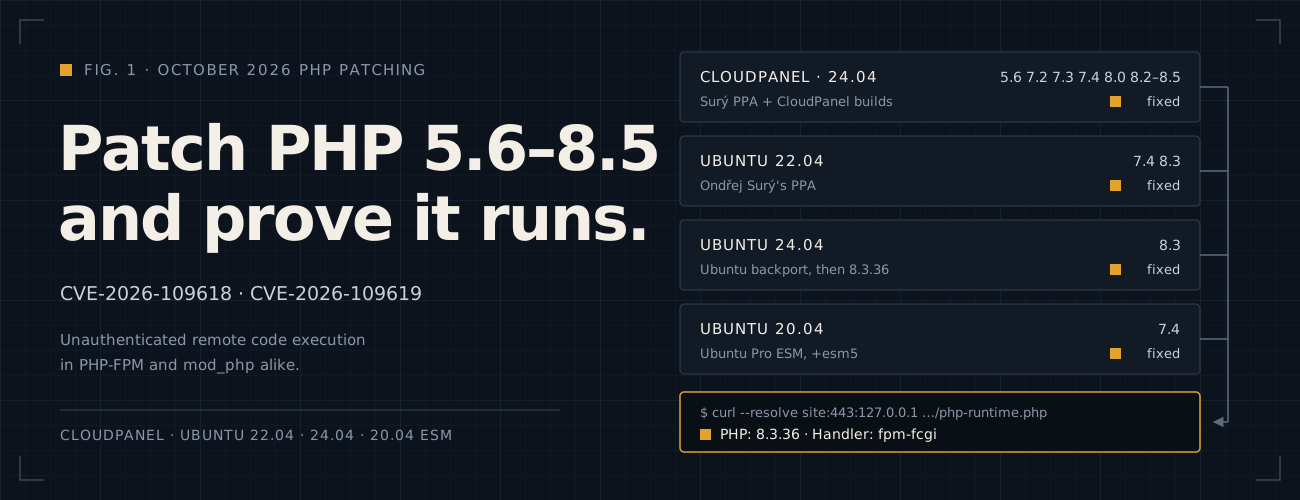
Two critical PHP bugs, CVE-2026-109618 and CVE-2026-109619 (CVSS 9.2), let an attacker run code on the server without logging in. Every PHP from 5.4 to 8.5.11 is affected, through PHP-FPM and Apache’s mod_php alike. According to PHP’s advisory of October 21, 2026 (opens in a new tab), there is no complete mitigation and updating is the only safe choice: to 8.5.12, 8.4.27, 8.3.36 or 8.2.35, or, for 8.1 and older, to your provider’s backport.
That week I patched a CloudPanel server and three standalone Ubuntu servers, running PHP branches from 5.6 to 8.5 between them. This note is what worked, the traps that cost me time, and how to prove that the website, not just the command line, now runs the fixed build. Still on PHP 7.4 or older? The patch buys time, not support: the companion note builds PHP 8.3 from source beside PHP 7.4 so sites can move one at a time.
TL;DR: find which PHP each site really runs, install your provider’s fixed build for that branch, restart every worker, then ask the website itself which build answers.
This applies if:
- OS: Ubuntu 20.04, 22.04 or 24.04, alone or with CloudPanel.
- PHP: any branch from 5.6 to 8.5, from Ubuntu, Ondřej Surý’s PPA or CloudPanel.
- Web server: Apache with mod_php or PHP-FPM, or Nginx with PHP-FPM.
- Access:
sudoon the server, and a maintenance window for the restarts.
Am I affected?
Both bugs live in how PHP handles state between requests, so they affect PHP-FPM and Apache’s mod_php alike:
- CVE-2026-109618: running out of memory can interrupt PHP while a request is half set up, and the cleanup then trusts the half-written data.
- CVE-2026-109619: state from one request can outlive its memory and be used by the next request on the same worker.
Your PHP is fixed if its package is at least the version below. A later revision of the same package includes the fix too.
| Where your PHP comes from | Fixed versions |
|---|---|
| PHP upstream (php.net) | 8.2.35, 8.3.36, 8.4.27, 8.5.12 |
Ubuntu 24.04 (php8.3) |
8.3.6-0ubuntu0.24.04.13 |
Ubuntu 20.04 (php7.4, ESM) |
7.4.3-4ubuntu2.29+esm5, through Ubuntu Pro |
| Ondřej Surý’s PPA | 5.6.40-104, 7.1.33-80, 7.2.34-66, 7.3.33-35, 7.4.33-31, 8.0.30-25, 8.1.34-9, 8.3.36 |
| CloudPanel’s own packages | 8.2.35-1+clp-noble, 8.3.36-2+clp-noble, 8.4.27-1+clp-noble, 8.5.12-1+clp-noble |
Who is Ondřej Surý? He maintains the PHP packages in Debian, and builds PHP for Ubuntu in his PPA,
ppa:ondrej/php (Debian users get the same builds from packages.sury.org). Its package versions end in
+deb.sury.org+1, which is why many guides call it “the Sury PPA”. This note writes his name, Surý. His site,
deb.sury.org (opens in a new tab), lists both repositories and how to support the work.
Two things surprise people:
- Ubuntu keeps the old version number. A patched Ubuntu 24.04 still says
PHP 8.3.6inphp -v. The fix is in the package revision (-0ubuntu0.24.04.13), so always compare the full revision. - PHP 8.1 and older get nothing from php.net. Only a package provider’s backport fixes them. Surý backported the fix to every branch from 5.6 to 8.1, under the same changelog entry. A backport fixes these two CVEs only: the branch is still end-of-life, so plan the move to a supported one.
How do I check whether my PHP is patched?
List every installed PHP package with its version:
dpkg-query -W -f='${binary:Package}\t${Version}\t${db:Status-Status}\n' | awk -F'\t' '$3 == "installed" && $1 ~ /^(php[0-9]|libapache2-mod-php)/ { print $1, $2 }'Then ask each branch’s changelog whether it mentions the two CVEs. A count of 0 means the installed package does not list the fix:
zgrep -cE 'CVE-2026-10961[89]' /usr/share/doc/php*-common/changelog.Debian.gzRead the changelog inside the package, not from apt-get changelog. On my servers that command failed for all three
providers: “Changelog unavailable” for the PPA and for ESM, and a 404 for Ubuntu’s own package. The changelog also
lives in the -common package: the -fpm package has none to search.
Before you start
- Find which PHP serves each site.
php -vonly shows the command-line PHP. One server can run several FPM versions and Apache’s module side by side. - Back up the configuration and the package list, and take a snapshot if you can: config files alone cannot roll back binaries.
- Use a maintenance window. Installing and restarting workers interrupts the requests in flight.
- Trust the changelog, not the version alone. Before installing a backport, check that its changelog names both CVEs.
For Apache, list the sites and how each one runs PHP:
sudo apache2ctl -Ssudo apache2ctl -M | grep -E 'php|mpm|proxy|fcgi'sudo grep -RInE 'ServerName|DocumentRoot|SetHandler|ProxyPassMatch' /etc/apache2/sites-enabledA site with SetHandler "proxy:unix:/run/php/php8.3-fpm.sock|fcgi://localhost" runs on that FPM pool. A site without
one runs on Apache’s mod_php, if mod_php is loaded.
For Nginx, match each site’s fastcgi_pass to the FPM pool that listens on it:
sudo grep -RInE 'server_name|fastcgi_pass' /etc/nginx/sites-enabledsudo grep -RInE '^[[:space:]]*listen[[:space:]]*=' /etc/php/*/fpm/pool.dCheck .htaccess and .user.ini files too: they can switch a site’s handler or settings.
Then save the configuration and the package list:
backup=$(sudo mktemp -d /var/backups/php-security.XXXXXX)for dir in /etc/php /etc/apache2 /etc/nginx; do if [ -d "$dir" ]; then sudo cp -a "$dir" "$backup/"; fidonedpkg-query -W | sudo tee "$backup/packages-before.txt" >/dev/nullecho "Backup saved in $backup"The later steps use $backup, so keep this shell open, or set backup= to the printed path again.
Pick your path
| Your server | Path | What I patched there |
|---|---|---|
| CloudPanel on Ubuntu 24.04 | 1. CloudPanel | 5.6, 7.2, 7.3, 7.4, 8.0 and 8.2 to 8.5 |
| Ubuntu 22.04 with Ondřej Surý’s PPA | 2. Ondřej Surý’s PPA | 7.4 and 8.3 |
| Ubuntu 24.04 with Ubuntu’s own PHP | 3. Ubuntu packages | 8.3: Ubuntu’s fix was already in; later moved to 8.3.36 from the PPA |
| Ubuntu 20.04 with PHP 7.4 | 4. Ubuntu Pro ESM | 7.4 |
The steps work for any branch the path supports: the last column is only what my servers ran.
Every path ends with the same check: ask the website.
Path 1: CloudPanel on Ubuntu 24.04
CloudPanel installs PHP 7.1 to 8.5 from its own repository, and its installer pins every package from that repository at priority 1000. It does not add Ondřej Surý’s PPA. On my host the panel update fixed the current branches, but the older ones only had fixed builds in the PPA, so they needed a provider switch.
On my host: PHP 5.6, 7.1, 7.2, 7.3, 7.4, 8.0, 8.1, 8.2, 8.3, 8.4 and 8.5. clp-update fixed 8.2 to 8.5, 5.6
was already fixed from the PPA, and I switched 7.2, 7.3, 7.4 and 8.0 to the PPA. 7.1 and 8.1 were installed, but no
site I mapped used them, so I left them for later.
Step 1: Run the panel update
sudo clp-updateThis updates the whole server, not just PHP. On my host it proposed 328 upgrades and 35 new packages, including the kernel, Nginx, SSH, the database and cache services, and CloudPanel itself. Read the list before you confirm, and do not interrupt APT once it starts installing. A new kernel needs a reboot, which step 10 covers.
Then check that nothing broke, and see where every installed branch now comes from:
sudo dpkg --auditsystemctl --failedapt-cache policy $(dpkg-query -W -f='${binary:Package}\n' 'php*-fpm' 2>/dev/null | grep -E '^php[0-9.]+-fpm$')For each branch, the line marked *** is the installed version, and the line under it names its repository. Then ask
the older branches’ changelogs:
for b in 7.1 7.2 7.3 7.4 8.0 8.1; do printf 'PHP %s: ' "$b" zgrep -cE 'CVE-2026-10961[89]' "/usr/share/doc/php$b-common/changelog.Debian.gz"doneCloudPanel’s 7.1 to 8.1 builds printed 0: their newest changelog entries were from July 2025. On my host the branches
fell into three groups:
| Branches | After clp-update |
What to do |
|---|---|---|
| 8.2 to 8.5 | CloudPanel’s own fixed builds | Only restart the workers, in step 9 |
| 5.6 | Surý’s PPA, already the fixed -104 build |
Upgrade it from the PPA, in step 3 |
| 7.1 to 8.1 | CloudPanel’s old, unfixed builds | Switch them to the PPA, steps 4 to 8 |
To see which sites use which branch, compare the fastcgi_pass lines with the pools, as in
Before you start. CloudPanel’s pools listen on local ports named after the branch: 127.0.0.1:14001
and up for PHP 7.4, 15001 and up for 8.0, and so on.
Step 2: Add Ondřej Surý’s PPA, if it is not there yet
Why I had it already: CloudPanel does not ship PHP 5.6, its oldest branch is 7.1, and one application on this
server still needs 5.6. I added Surý’s PPA to install php5.6-fpm for that site. That is also why this host had fixed
builds within reach for the older branches.
A stock CloudPanel server has no Surý packages at all. Check whether the PPA is set up:
grep -rl 'ondrej/php' /etc/apt/sources.list.d/ || echo 'PPA not added'If it is not, add it the way its Launchpad page (opens in a new tab) describes:
sudo apt-get install software-properties-commonsudo add-apt-repository ppa:ondrej/phpsudo apt-get updateThe PPA builds for Ubuntu 22.04 and 24.04. For newer releases, it points to packages.sury.org (opens in a new tab) instead.
Adding the PPA does not touch CloudPanel’s PHP yet: CloudPanel’s pin at 1000 still beats the PPA’s default 500, which
step 4 shows. It does bring newer builds of some shared libraries, though, so simulate the next upgrade
(sudo apt-get -s upgrade) before you run one.
Step 3: Upgrade the branches that already come from the PPA
CloudPanel has no package of its own for PHP 5.6, so its pin does not get in the way: a normal upgrade from the PPA
is enough. The commands below use b=5.6. For any other branch that already comes from the PPA, change only that
line.
b=5.6apt-cache policy "php$b-fpm"
mapfile -t packages < <(  dpkg-query -W -f='${binary:Package} ${db:Status-Status}\n' |    awk -v b="$b" '$2 == "installed" && ($1 == "php" b || index($1, "php" b "-") == 1) { print $1 }')
sudo apt-get -s --no-remove --only-upgrade install "${packages[@]}"sudo apt-get --no-remove --only-upgrade install "${packages[@]}"zgrep -cE 'CVE-2026-10961[89]' "/usr/share/doc/php$b-common/changelog.Debian.gz"
The last line should print 1 or more. The 5.6 entry reads “Backported from 8.2.35: [CVE-2026-109618, CVE-2026-109619]:
Avoid state corruption via bailout”. My 5.6 was already the fixed 5.6.40-104, so the simulation had nothing to
install; a newer revision such as -105 has the fix too. Its FPM service is restarted with the others in step 9.
Step 4: Pick a branch and see why it did not move
Steps 4 to 8 switch one branch from CloudPanel’s build to the PPA’s. They are the same for 7.1, 7.2, 7.3, 7.4, 8.0
and 8.1. The only thing to change is the b= line: every command after it uses $b. Run steps 4 to 8 for one
branch, test its sites, then start again here with the next. I started with the branch that served the fewest sites.
b=7.4apt-cache policy "php$b-fpm"sudo grep -RInE 'Package:|Pin:|Pin-Priority:' /etc/apt/preferences.dCloudPanel pins its own repository at priority 1000 and the PPA sits at 500, so APT keeps choosing CloudPanel’s old package even though the PPA has a fixed one.
Step 5: Pin the branch to the PPA, and check the new build first
A narrow pin for this one branch makes the PPA’s build the candidate and leaves CloudPanel’s global pin alone. Priority 1001 lets APT replace a package even when CloudPanel’s version string sorts higher, and APT may call some of these switches downgrades for that reason:
sudo tee "/etc/apt/preferences.d/php$b-sury.pref" >/dev/null <<EOFPackage: php$b php$b-*Pin: origin ppa.launchpadcontent.netPin-Priority: 1001EOF
apt-cache policy "php$b-fpm"
The file name must end in .pref: APT silently ignores other names in preferences.d, and php7.4-sury alone would
count as the extension .4-sury. The candidate should now be the PPA’s build. Nothing is installed yet.
Before installing, download the candidate into a folder of your own, check that its changelog names the fixes, and
test its FPM binary against the pools CloudPanel already has. No sudo is needed until the last line:
mkdir -p ~/php-package-review && cd ~/php-package-reviewrm -rf "php$b-common_"*.deb "php$b-fpm_"*.deb "candidate-$b"apt-get download "php$b-common" "php$b-fpm"for deb in "php$b-common_"*.deb "php$b-fpm_"*.deb; do dpkg-deb -x "$deb" "candidate-$b"; done
zgrep -cE 'CVE-2026-10961[89]' "candidate-$b/usr/share/doc/php$b-common/changelog.Debian.gz"sudo "candidate-$b/usr/sbin/php-fpm$b" -t --fpm-config "/etc/php/$b/fpm/php-fpm.conf"
The count should be 1 or more, and the test should end with test is successful. These are the fixed builds I
installed:
| Branch | PPA build |
|---|---|
| 7.1 | 7.1.33-80+ubuntu24.04.1+deb.sury.org+1 |
| 7.2 | 7.2.34-66+ubuntu24.04.1+deb.sury.org+1 |
| 7.3 | 7.3.33-35+ubuntu24.04.1+deb.sury.org+1 |
| 7.4 | 1:7.4.33-31+ubuntu24.04.1+deb.sury.org+1 |
| 8.0 | 1:8.0.30-25+ubuntu24.04.1+deb.sury.org+1 |
| 8.1 | 8.1.34-9+ubuntu24.04.1+deb.sury.org+1 |
Step 6: Note the extensions CloudPanel loads by hand
CloudPanel’s php.ini files load some extensions directly, with extension= lines near the end. Surý’s packages load
extensions from conf.d instead, and the switch does not bring CloudPanel’s along. List them before the switch:
sudo grep -nE '^[[:space:]]*(zend_)?extension[[:space:]]*=' "/etc/php/$b/cli/php.ini" "/etc/php/$b/fpm/php.ini"On my host 7.2, 7.3 and 7.4 loaded mcrypt, memcached, redis and imagick; 8.0 loaded the same without mcrypt.
Step 7: Switch the branch, with its extensions
Simulate the switch for every installed package of the branch, plus the PPA’s packages for the extensions from step 6, then run it. Change the extension list to match what step 6 printed:
mapfile -t packages < <(  dpkg-query -W -f='${binary:Package} ${db:Status-Status}\n' |    awk -v b="$b" '$2 == "installed" && ($1 == "php" b || index($1, "php" b "-") == 1) { print $1 }')extensions=("php$b-mcrypt" "php$b-memcached" "php$b-redis" "php$b-imagick")
sudo apt-get -s --no-remove install "${packages[@]}" "${extensions[@]}"sudo apt-get --no-remove -o Dpkg::Options::='--force-confold' install "${packages[@]}" "${extensions[@]}"
--no-remove makes APT stop rather than remove anything. On my host each switch replaced about 20 packages, added the
extensions plus igbinary and msgpack, which memcached and redis need, and removed nothing.
Step 8: Restore the settings, then restart
The switch replaced CloudPanel’s php.ini files, even with --force-confold. The new ones lost the upload limits,
memory limit, short tags, session lifetime and timezone. Put the backed-up files back. The security fix is in the
binaries, so restoring the configuration keeps it:
sudo cp -a "$backup/php/$b/cli/php.ini" "/etc/php/$b/cli/php.ini"sudo cp -a "$backup/php/$b/fpm/php.ini" "/etc/php/$b/fpm/php.ini"sudo cp -a "$backup/php/$b/fpm/php-fpm.conf" "/etc/php/$b/fpm/php-fpm.conf"The restored files still load the extensions by hand, and conf.d now loads them too. Check that conf.d has them,
then comment out only the duplicate lines in php.ini:
grep -H '^extension=' "/etc/php/$b/cli/conf.d/"*.ini "/etc/php/$b/fpm/conf.d/"*.ini |  grep -E 'mcrypt|memcached|redis|imagick'
for ini in "/etc/php/$b/cli/php.ini" "/etc/php/$b/fpm/php.ini"; do  sudo sed -i -E \    '/^[[:space:]]*extension[[:space:]]*=[[:space:]]*(mcrypt|memcached|redis|imagick)\.so[[:space:]]*$/s/^/; Loaded through conf.d: /' \    "$ini"done
Left in, the duplicates produce Module 'imagick' already loaded warnings, and memcached and redis fail with
undefined symbol: php_json_decode_ex, because php.ini loads them before the JSON module. Then check, restart and
look at the result:
"php$b" -msudo "php-fpm$b" -t
sudo systemctl daemon-reloadsudo systemctl restart "php$b-fpm"systemctl is-active "php$b-fpm" nginxsudo ss -ltnp | grep "php-fpm$b"sudo journalctl -u "php$b-fpm" --since '2 minutes ago' --no-pagersudo apt-get -s upgrade | awk -v b="$b" '$1 == "Inst" && ($2 == "php" b || index($2, "php" b "-") == 1)'
php -m should list the extensions with no warnings above it. daemon-reload matters because the PPA’s systemd unit
differs from CloudPanel’s: it restarts only on failure, and adds a socket helper. ss should show the pool’s ports
listening again. The last command simulates the next upgrade. Any line it prints must name the PPA (PPA for PHP) as
the source: a line that names CloudPanel’s repository means the branch would swap back, so check the pin.
Test the branch’s sites, then go back to step 4 and change b= to the next branch. I switched 7.2, 7.3, 7.4 and 8.0
this way; 7.1 and 8.1 take exactly the same steps. If no site uses a branch, removing it is simpler still, once you have
checked that nothing points at its FPM pool.
Step 9: Restart every PHP-FPM service
Restart every running PHP-FPM service, so none keeps workers from before the fixes. That covers 8.2 to 8.5 from
clp-update and 5.6 from step 3:
systemctl list-units --type=service --state=running --plain --no-legend 'php*-fpm.service' | awk '{ print $1 }' | xargs -r sudo systemctl restartsystemctl list-units --type=service --plain --no-legend 'php*-fpm.service'sudo nginx -tsudo dpkg --auditEvery PHP-FPM unit should show active running, and nginx -t should succeed.
Step 10: Reboot for the new kernel
clp-update installed a new kernel that only runs after a reboot. The reboot interrupts every site and your SSH
session, so do it in the window, with console access at hand:
sudo rebootOnce the server is back:
uname -rsystemctl --failedsystemctl list-units --type=service --plain --no-legend 'nginx.service' 'mysql.service' 'php*-fpm.service'uname -r should print the new kernel, systemctl --failed should list nothing, and every service should be active.
Then ask the website which build it runs.
Path 2: Ubuntu 22.04 with Ondřej Surý’s PPA
On my host: PHP 7.4 from 7.4.33-30 to 7.4.33-31, and PHP 8.3 from 8.3.33 to 8.3.36, both from the PPA.
Apache served every site through PHP-FPM: most on the 7.4 pool, a few on 8.3.
This host already used the PPA, so the fixed builds were one refresh away. To add the PPA first, see Path 1, step 2. On a server that runs Ubuntu’s own PHP, adding it switches providers, so Path 3 is the smaller change.
Step 1: Refresh and check the candidates
sudo apt-get updateapt-cache policy php7.4-fpm php8.3-fpmBefore the refresh, APT still offered 8.3.35 and no new 7.4. After it, the candidates were the fixed 7.4.33-31 and
8.3.36. Check their changelogs inside the packages, as in
Path 1, step 5, with b=7.4 and then b=8.3:
apt-get changelog could not fetch them. The 7.4 entry names both CVEs, backported from 8.2.35.
Step 2: Simulate the upgrade of every installed package of those branches
mapfile -t packages < <(  dpkg-query -W -f='${binary:Package} ${db:Status-Status}\n' |    awk '$2 == "installed" && $1 ~ /^(php(7[.]4|8[.]3)($|-)|libapache2-mod-php(7[.]4|8[.]3)$)/ { print $1 }')
sudo apt-get -s --no-remove --only-upgrade install "${packages[@]}"
Change 7[.]4|8[.]3 to the branches you run. Upgrading every package of a branch together keeps its extensions on the
same build. Mine showed 28 upgrades, no new packages and no removals.
Step 3: Install, then test the configuration
sudo php-fpm7.4 -t && sudo php-fpm8.3 -t && sudo apache2ctl configtest
sudo apt-get --no-remove --only-upgrade -o Dpkg::Options::='--force-confold' install "${packages[@]}"
sudo diff -qr "$backup/php" /etc/phpsudo php-fpm7.4 -t && sudo php-fpm8.3 -t && sudo apache2ctl configtest
The host also had the libapache2-mod-php packages installed but not enabled, so the install printed notices that
suggest a2enmod and a2enconf. Do not run them when the sites already use FPM: they would switch Apache to
mod_php.
Step 4: Restart the workers
The new code only runs in new workers:
sudo systemctl restart php7.4-fpm php8.3-fpmsystemctl is-active php7.4-fpm php8.3-fpm apache2dpkg-query -W -f='${Package}\t${Version}\n' php7.4-fpm php8.3-fpmsudo dpkg --auditIf Apache’s mod_php serves any site, restart apache2 too.
Path 3: Ubuntu 24.04 with Ubuntu’s own PHP
On my host: PHP 8.3 on Apache’s mod_php, already at the fixed 8.3.6-0ubuntu0.24.04.13. I restarted Apache to be
sure it ran the fix, and later moved the host to upstream 8.3.36 from Surý’s PPA.
Ubuntu backports the fix into its own 8.3.6 package, so you do not need a PPA to be safe. Ubuntu’s security tracker
rates both CVEs Critical and lists 8.3.6-0ubuntu0.24.04.13 as the fixed revision for 24.04:
CVE-2026-109618 (opens in a new tab), CVE-2026-109619 (opens in a new tab).
Step 1: Check the revision and its changelog
sudo apt-get updateapt-cache policy php8.3-common libapache2-mod-php8.3zgrep -i -C 5 -E 'CVE-2026-10961[89]' /usr/share/doc/php8.3-common/changelog.Debian.gzUbuntu’s entry starts with “SECURITY UPDATE: Remote RCE via state corruption issue” and names both CVEs. If the
installed revision is older than 8.3.6-0ubuntu0.24.04.13, upgrade the installed php8.3 packages with the same steps
as Path 2, using 8[.]3 as the branch.
Step 2: Find out when it arrived, and restart
The fixed package was already installed before I looked. The package log shows when:
sudo zgrep -hE '(install|upgrade) (libapache2-mod-php8\.3|php8\.3-common)(:amd64)? ' /var/log/dpkg.log*On my host the .13 revision arrived on October 22, the day after the release. That log does not show whether Apache
restarted afterwards, and mod_php runs inside Apache’s workers, so restart it:
sudo apache2ctl configtest && sudo systemctl restart apache2systemctl is-active apache2If the site uses PHP-FPM, restart php8.3-fpm instead.
Step 3 (optional): Move to upstream 8.3.36
Ubuntu’s 8.3.6 with backports is safe. I still moved this host to Surý’s 8.3.36, which tracks upstream PHP. This
switches who maintains the server’s PHP, so it is a choice, not part of the fix. Add the PPA as in
Path 1, step 2, then simulate and install every PHP 8.3
package together:
mapfile -t packages < <(  dpkg-query -W -f='${binary:Package} ${db:Status-Status}' |    awk '$2 == "installed" && $1 ~ /^(php8[.]3($|-)|libapache2-mod-php8[.]3$)/ { print $1 }')
sudo apt-get -s --no-remove --only-upgrade install "${packages[@]}"sudo apt-get --no-remove --only-upgrade -o Dpkg::Options::='--force-confold' install "${packages[@]}"
sudo diff -qr "$backup/php/8.3" /etc/php/8.3sudo apache2ctl configtest && sudo systemctl restart apache2
All 13 packages moved to 8.3.36, with no new packages or removals, and /etc/php/8.3 matched the backup. The package
also replaced /etc/apache2/mods-available/php8.3.conf; it still hands .php files to mod_php.
Path 4: Ubuntu 20.04 with Ubuntu Pro (ESM)
On my host: PHP 7.4, to the fixed 7.4.3-4ubuntu2.29+esm5 build, served by both mod_php and FPM.
Ubuntu 20.04 is out of standard support, so its PHP 7.4 fix (7.4.3-4ubuntu2.29+esm5, the revision
Ubuntu’s tracker (opens in a new tab) lists for 20.04) only comes through Ubuntu Pro’s
Expanded Security Maintenance. Without it, APT offered nothing newer than 7.4.3-4ubuntu2.29, whose changelog does not
name the fixes. Surý’s free PPA does not build for 20.04: do not point 20.04 at the 22.04 or 24.04 repositories to
get newer PHP.
Step 1: Get an Ubuntu Pro subscription
Ubuntu Pro is free for personal use (opens in a new tab) on up to 5 machines, or 50 for official Ubuntu Community members. Sign in at ubuntu.com/pro (opens in a new tab) with an Ubuntu One account to get it. Servers that run a business or a client’s sites need a paid subscription.
Step 2: Update the Pro client, attach the server and turn on ESM
My host had an old Pro client (28.1). Update it first; this changes no PHP package:
sudo apt-get updatesudo apt-get --no-remove install --only-upgrade ubuntu-advantage-toolssudo pro statusOn my host pro status then failed with “Cannot verify certificate of server”, because a custom OpenSSL in
/usr/local looked for CA certificates in /usr/local/ssl, where there were none. curl worked, so the network was fine. Pointing each pro
command at the system CA bundle fixed it, with verification still on:
sudo env SSL_CERT_FILE=/etc/ssl/certs/ca-certificates.crt pro statusIf pro status works without it on your server, drop the env SSL_CERT_FILE=… part from the commands below. To attach,
copy your token from the Ubuntu Pro dashboard (opens in a new tab) and replace TOKEN:
sudo env SSL_CERT_FILE=/etc/ssl/certs/ca-certificates.crt pro attach TOKENThe token is a secret: anyone who has it can attach machines to your subscription. Keep it out of scripts, tickets and
shared logs, and clear it from the shell history afterwards (history -d with the line number, or start the command
with a space if HISTCONTROL includes ignorespace). If it ever ends up somewhere shared, reset it in the dashboard.
Each attached server uses one of your machines, and sudo pro detach gives it back.
Attaching enabled ESM Apps and ESM Infra. It also tried Livepatch and reported “Failed to enable default services”; Livepatch is separate from PHP updates, so that can wait. Check the status and refresh APT:
sudo env SSL_CERT_FILE=/etc/ssl/certs/ca-certificates.crt pro statussudo apt-get updateapt-cache policy php7.4-common php7.4-fpm libapache2-mod-php7.4esm-infra and esm-apps should show enabled, and the candidates should be 7.4.3-4ubuntu2.29+esm5 from
esm.ubuntu.com.
Step 3: Check the ESM build, then upgrade
apt-get changelog cannot fetch ESM changelogs, and downloading as a normal user fails with 401 Unauthorized: the
ESM credentials are readable by root only. Download with sudo:
mkdir -p ~/php74-security-check && cd ~/php74-security-checksudo apt-get download php7.4-common=7.4.3-4ubuntu2.29+esm5sudo dpkg-deb -x php7.4-common_7.4.3-4ubuntu2.29+esm5_amd64.deb candidatezgrep -i -C 5 -E 'CVE-2026-10961[89]' candidate/usr/share/doc/php7.4-common/changelog.Debian.gzAPT warns that the download ran “unsandboxed as root”, because the _apt user cannot write to your home folder. That is
harmless. The changelog should show debian/patches/CVE-2026-109618_109619.patch. Then simulate and install every PHP
7.4 package together, as in Path 2 with 7[.]4 as the branch:
mapfile -t packages < <(  dpkg-query -W -f='${binary:Package} ${db:Status-Status}\n' |    awk '$2 == "installed" && $1 ~ /^(php7[.]4($|-)|libapache2-mod-php7[.]4$)/ { print $1 }')
sudo apt-get -s --no-remove --only-upgrade install "${packages[@]}"sudo apt-get --no-remove --only-upgrade -o Dpkg::Options::='--force-confold' install "${packages[@]}"sudo diff -qr "$backup/php/7.4" /etc/php/7.4
On my host this upgraded 19 packages to +esm5, including mod_php, FPM, the CLI and the packaged extensions. It
added and removed nothing, and the php.ini files and Imagick were untouched. pro can also confirm the result:
sudo pro fix CVE-2026-109618 --dry-run reports whether the CVE still affects the server, without changing anything.
Step 4: Restart both kinds of worker
This host served PHP through both mod_php and FPM, so both needed new workers:
sudo php-fpm7.4 -t &&  sudo apache2ctl configtest &&  sudo systemctl restart php7.4-fpm apache2
systemctl is-active apache2 php7.4-fpmsudo dpkg --audit
The probe below then showed 7.4.3-4ubuntu2.29+esm5 on both a mod_php site (apache2handler) and an FPM site
(fpm-fcgi). No OS upgrade or custom build was needed.
Without Ubuntu Pro, the options are a paid PHP LTS such as Freexian’s (opens in a new tab), a PHP 7.4 build from PHP’s own source backport (opens in a new tab), or moving the server to 22.04 or 24.04. I also built PHP 8.3 from source on this host, but only to move sites off 7.4 later: that is a separate note, not part of the fix.
How do I prove the website runs the fixed PHP?
A fixed package and a running service do not prove which PHP answers the website. This script drops a tiny probe into the site’s document root, asks the site for it over local HTTPS, and deletes it again, even if a step fails:
(  set -e  root=/var/www/example.com/public  host=example.com  probe=$(sudo mktemp "$root/php-runtime-XXXXXXXX.php")  trap 'sudo rm -f -- "$probe"' EXIT
  sudo tee "$probe" >/dev/null <<'PHP'<?php$ip = isset($_SERVER['REMOTE_ADDR']) ? $_SERVER['REMOTE_ADDR'] : '';if (!in_array($ip, array('127.0.0.1', '::1'), true)) {    http_response_code(404);    exit;}header('Content-Type: text/plain');header('Cache-Control: no-store');echo 'PHP: ', PHP_VERSION, "\n";echo 'Handler: ', PHP_SAPI, "\n";echo 'INI: ', php_ini_loaded_file(), "\n";echo 'Upload progress: ', ini_get('session.upload_progress.enabled') ? 'on' : 'off', "\n";PHP
  sudo chmod 644 "$probe"  curl --fail --silent --show-error --max-time 20 --noproxy '*' \    --resolve "$host:443:127.0.0.1" \    "https://$host/$(basename "$probe")")
Set root and host for each site. The probe answers only requests from the server itself and returns 404 to
everyone else, so opening it in your own browser shows a 404 too. It is written to run on PHP 5.6 as well. Handler
reads apache2handler for mod_php and fpm-fcgi for PHP-FPM.
Do not check with a public phpinfo() page instead. It shows the server’s whole configuration to anyone who finds
the URL, for as long as you forget to delete it. Two caveats for the probe:
- If a reverse proxy on the same machine forwards public traffic, the public requests also arrive from
127.0.0.1. The probe only lives for a second, but know that it is reachable during that second. - Prepend files, such as Wordfence’s firewall, run before the probe.
PHP_VERSION shows the base version (8.3.6 on Ubuntu, 7.4.3-4ubuntu2.29+esm5 on ESM), so compare it with the
package revision you installed. Then test the parts of the application that matter: logging in, pages that read the
database, and uploads.
How do I lower the risk before I can patch?
These lower the risk while you prepare the update. None of them replaces it.
-
Turn off session upload progress in the startup configuration, then restart every worker. On October 23, PHP published a follow-up advisory (CVE-2026-115560) about an unlikely remote code execution path through it, and suggests the same until the next regular release:
session.upload_progress.enabled = 0Set it in each branch’s
php.ini, or per FPM pool withphp_admin_flag[session.upload_progress.enabled] = off.ini_set()in application code runs too late. Applications that never change the session serialize handler at runtime can keep the feature on. The probe above prints its current state. -
Limit what requests can make PHP allocate, at the web server or proxy: body size, upload size, multipart headers and input nesting. Block multipart requests on paths that do not need them.
-
Be careful with
memory_limit = -1. PHP’s advisory for CVE-2026-109618 (opens in a new tab) suggests it to remove one predictable trigger, but it also removes the per-request memory cap, so it needs memory limits on the workers or containers instead. PHP advises againstRLIMIT_ASandRLIMIT_DATAfor this.
Nginx, October 14
Nginx fixed five issues on October 14: CVE-2026-15176, CVE-2026-93479, CVE-2026-95101, CVE-2026-97629 and CVE-2026-97205. The fixed releases are 1.30.6 (stable) and 1.31.7 (mainline). Which configurations are affected differs per issue, so read Nginx’s advisories (opens in a new tab). The same day, njs 1.0.2 fixed CVE-2026-101025 and CVE-2026-101019, for servers that use Nginx’s JavaScript module.
nginx -v shows the binary on disk. Check the package, then ask the running master process which binary it started
from:
nginx -vdpkg-query -W -f='${Package}\t${Version}\n' 'nginx*' 'libnginx-mod-*'
pid=$(systemctl show nginx -p MainPID --value)if [ "$pid" -gt 0 ]; then  sudo "/proc/$pid/exe" -v  sudo readlink "/proc/$pid/exe"fi
My CloudPanel host had 1.30.6-1+clp-noble for Nginx and every module, and the running master reported nginx/1.30.6
from /usr/sbin/nginx, with no (deleted) after the path. If you see (deleted), the package was upgraded but Nginx
was never restarted. This check does not cover njs or third-party modules.
Sources
- PHP security advisory, October 21, 2026 (opens in a new tab), and the GitHub advisories for CVE-2026-109618 (opens in a new tab) and CVE-2026-109619 (opens in a new tab)
- Google Cloud: responding to the core PHP vulnerabilities (opens in a new tab)
- Ubuntu: CVE-2026-109618 (opens in a new tab) and CVE-2026-109619 (opens in a new tab)
- deb.sury.org (opens in a new tab), Ondřej Surý’s PHP repositories for Debian and Ubuntu
- Ondřej Surý’s PHP PPA (opens in a new tab) and its support statement
- Nginx security advisories (opens in a new tab) and news (opens in a new tab)